
Dupeguru || duplicate file finder
dupeGuru: The Ultimate Guide to dupeGuru and Duplicate File Finder Software
Managing digital files can become challenging as storage fills up with duplicate photos, music, videos, and documents. Over time, these unnecessary copies consume valuable disk space and make file organization more difficult. That’s why many users search for dupeGuru and duplicate file finder solutions to help identify and remove duplicate files safely.
Whether you’re organizing a personal computer or managing business data, dupeGuru is a popular option for simplifying file management.
What Is dupeGuru?
dupeGuru is a free, open-source duplicate file finder designed to scan your computer for duplicate files based on file content rather than just filenames. It helps users reclaim storage space while keeping their file collections organized.
The software supports Windows, macOS, and Linux, making it a versatile choice for users across different operating systems.
Why Choose dupeGuru as Your Duplicate File Finder?
There are several reasons why dupeGuru is widely recommended.
Accurate Duplicate Detection
dupeGuru compares file contents to identify duplicates, even when filenames differ.
Cross-Platform Compatibility
The application works on Windows, macOS, and Linux.
Free and Open Source
Users can download and use the software without purchasing a license.
User-Friendly Interface
Its simple layout makes duplicate scanning easy for both beginners and experienced users.
Key Features of dupeGuru
dupeGuru includes several powerful tools for file management.
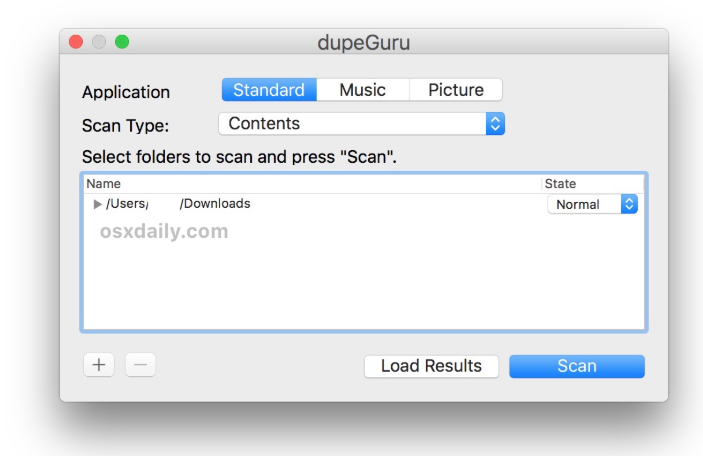
Intelligent File Matching
Detects duplicate files using advanced comparison algorithms.
Image Mode
Finds visually similar images, even if file sizes or formats differ.
Music Mode
Compares audio files using metadata and song information to identify duplicate music files.
Flexible Scanning
Users can scan selected folders instead of an entire drive.
Benefits of Using a Duplicate File Finder
A reliable duplicate file finder offers several advantages.
Recover Disk Space
Removing duplicate files frees valuable storage.
Improve File Organization
Fewer duplicate files make folders easier to manage.
Faster Backups
Smaller data sets reduce backup time and storage requirements.
Better System Efficiency
Organized storage can simplify file searches and maintenance.
Common Uses for dupeGuru
dupeGuru is useful in many situations.
Organizing Photo Libraries
Remove duplicate images from large collections.
Cleaning Music Collections
Identify repeated songs across multiple folders.
Managing Documents
Find duplicate PDFs, Word files, spreadsheets, and presentations.
Preparing External Drives
Clean USB drives and backup disks before archiving important files.
Best Practices When Using dupeGuru
Review Results Carefully
Always verify duplicates before deleting them.
Keep Important Backups
Create a backup before making large changes to your files.
Scan Specific Folders
Target folders with the highest chance of duplicate files.
Use Built-In Filters
Take advantage of filtering options to improve scan accuracy.
Why Duplicate File Finder Tools Matter
A duplicate file finder helps users maintain an organized computer by eliminating unnecessary file copies. Instead of manually comparing thousands of files, specialized software automates the process while reducing the risk of accidental deletion.
For users with large media libraries, duplicate file finder applications can save significant time and storage space.
Frequently Asked Questions
What is dupeGuru?
dupeGuru is a free, open-source application that helps users locate and manage duplicate files on Windows, macOS, and Linux.
Is dupeGuru free?
Yes. dupeGuru is open-source software available without licensing fees.
What is a duplicate file finder?
A duplicate file finder is software that scans storage devices to locate identical or very similar files, helping users recover storage space and improve organization.
Can dupeGuru find duplicate photos?
Yes. It includes an image mode capable of identifying visually similar images.
Does dupeGuru support music files?
Yes. Music mode compares audio files using metadata and related information to identify duplicates.
Why are dupeGuru and duplicate file finder included throughout the article?
Using dupeGuru and duplicate file finder naturally throughout the content improves SEO while providing readers with clear, relevant, and informative information.
Conclusion
dupeGuru is a powerful and reliable solution for anyone looking to organize digital storage and eliminate unnecessary duplicate files. As an open-source duplicate file finder, it offers intelligent scanning, cross-platform compatibility, and specialized modes for images and music. Whether you’re freeing disk space, organizing media libraries, or improving file management, dupeGuru provides an efficient way to keep your computer clean and well organized.